
By Hateng Laser | 9 min read
You need a 3D laser only when the area you’re marking changes height by more than the laser’s focus range can cover. That means steep curves, domes, stepped faces and deep recesses. For flat parts, gently curved parts and anything you can fixture level, a standard 2D fiber laser marking engraving machine does the job, and that covers most industrial marking.
Key insights
- 2D and 3D describe focus, not the mark: both put marks on a surface, but 3D can shift focus height during the mark.
- The real limit is depth of focus: if your marking area stays within that zone, 2D is enough.
- Fixturing solves a lot of “3D” problems: tilting or holding a part level often removes the need for 3D.
- 3D adds cost and complexity: it’s worth it for genuinely curved or stepped surfaces, not as a precaution.
Before you go
Measure the height difference across the area you actually need to mark, not the whole part. A part can be very three-dimensional overall while the patch you mark is almost flat.
When you start shopping for a laser marker, “3D” sounds like the obvious upgrade. If 2D is good, surely 3D is better? It’s an easy assumption to make, and some sales pitches lean right into it.
In practice, most parts marked in Indian workshops, from tools and auto parts to nameplates and electronic components, never need 3D. The mark goes on a face that’s flat, or flat enough. A good 2D machine with sensible fixturing handles it.
But some parts really do need 3D, and it’s worth knowing which ones. Let’s look at what the two terms mean, where the line sits, and how to tell which side your parts are on.
What do 2D and 3D actually mean on a laser marker?
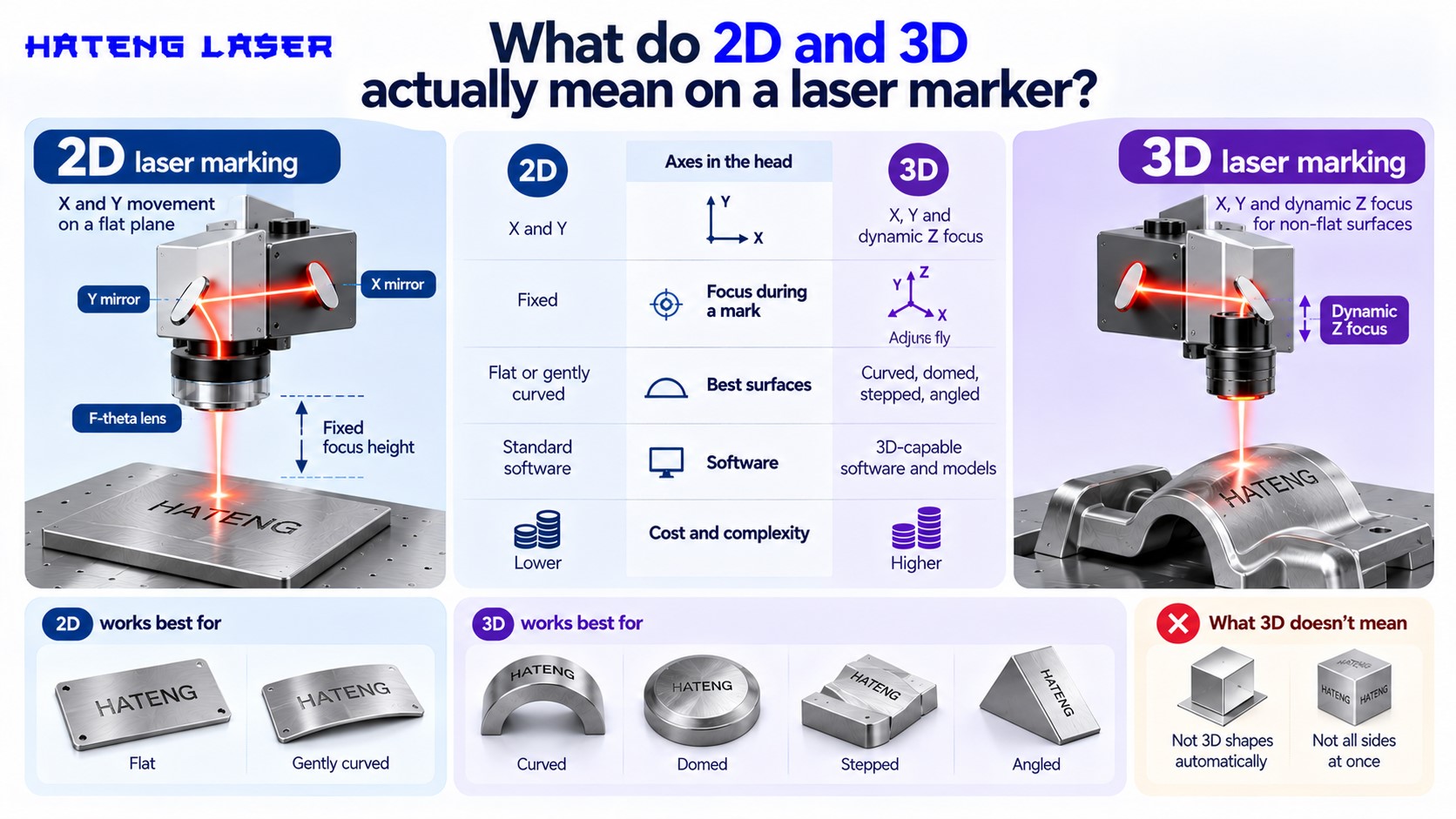
The names cause confusion, so let’s clear them up.
2D laser marking
A 2D machine moves the beam across a flat plane using two galvo mirrors, an X mirror and a Y mirror. The F-theta lens focuses the beam onto that plane. Focus height is fixed for each job, set by adjusting the column.
3D laser marking
A 3D machine adds a third axis inside the head, often called dynamic focus. It shifts the focus point up and down while marking, so the beam stays sharp as the surface rises and falls.
What 3D doesn’t mean
It doesn’t mean the laser carves 3D shapes by itself, and it doesn’t mean it marks all sides of a part at once. It just keeps focus on a surface that isn’t flat.
| 2D laser marker | 3D laser marker | |
| Axes in the head | X and Y | X, Y and dynamic Z focus |
| Focus during a mark | Fixed | Adjusts on the fly |
| Best surfaces | Flat or gently curved | Curved, domed, stepped, angled |
| Software | Standard marking software | Needs 3D-capable software and models |
| Cost and complexity | Lower | Higher |
Why does focus matter so much?
Everything here comes back to focus. Once that clicks, the 2D vs 3D question gets easy.
A laser is sharp only near its focus
A focused laser beam has a narrow waist where it’s tightest. Move away from that point and the beam spreads out. The distance over which it stays reasonably tight is often described through the Rayleigh length, which sets the practical depth of focus.
What happens out of focus
Outside the focus zone, the spot gets bigger and the energy spreads out. The mark gets wider, fainter or patchy, and fine codes stop scanning.
Same idea as a camera
It works much like depth of field in photography. There’s a zone where things are sharp, and anything closer or further away goes soft.
When is a 2D fiber laser enough?
More often than you’d think. Here’s where 2D is the right call.
Flat faces
Nameplates, tags, flat tool faces, panels, flat sides of housings. These are pure 2D jobs.
Gently curved surfaces
A shaft, a pipe or a rounded handle can often be marked in 2D if the mark is small enough that the curve stays within the focus zone across it.
Small marks on bigger shapes
A serial number or QR code covers a small area. Even on a curved part, that small patch is often close enough to flat.
Parts you can fixture level
Tilting or holding the part so the marking face sits level under the lens removes most of the height variation.
When do you genuinely need 3D?
These are the jobs where 2D starts to struggle, no matter how good the fixturing.
Steep curves with large marks
A big logo wrapped around a tight curve will run out of focus at the edges on a 2D machine.
Domes and spheres
A mark on a domed cap or a spherical surface changes height in every direction.
Stepped faces
If one mark has to cross two levels, such as a logo across a step or a raised boss, focus has to change mid-mark.
Angled or tapered faces
Long marks on a cone or a sloping face drift out of focus from one end to the other.
| Part shape | Mark size | 2D or 3D? |
| Flat plate or tag | Any | 2D |
| Shaft or pipe | Small serial or code | Usually 2D |
| Shaft or pipe | Long wrap-around text | 3D or a rotary setup |
| Domed cap | Small mark at the top | Often 2D |
| Domed cap | Large logo | 3D |
| Stepped face | Mark across the step | 3D |
| Sloping face | Short mark | Usually 2D |
| Sloping face | Long mark | 3D, or tilt the part |
Can you avoid 3D with smarter setup?
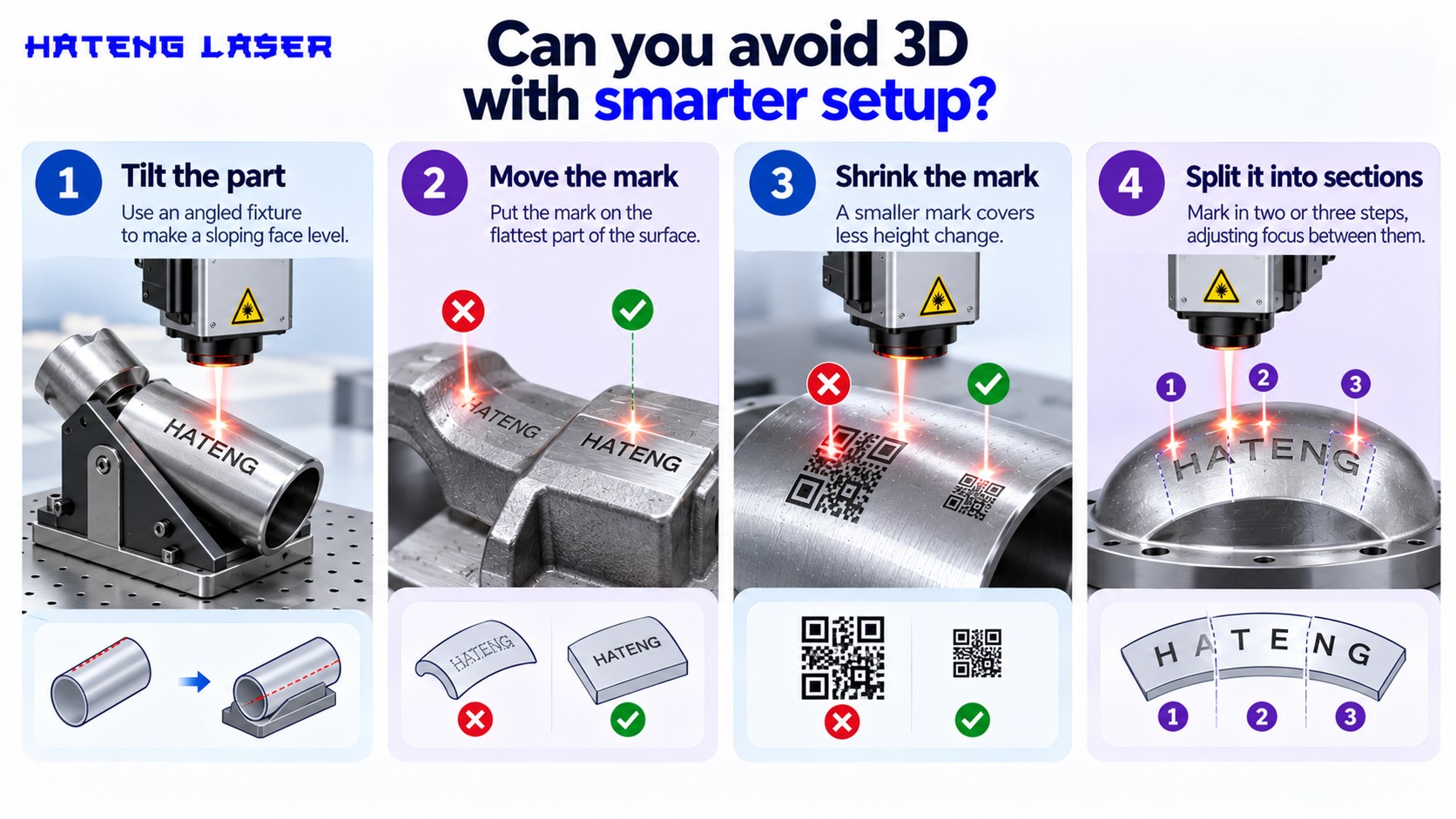
Very often, yes. Before paying for 3D, try these.
Tilt the part
A simple angled fixture can turn a sloping face into a level one under the lens.
Move the mark
If the drawing allows, put the mark on the flattest part of the surface. Engineers are often happy to shift a serial number a few millimetres.
Shrink the mark
A smaller mark covers less height change. A compact QR code can sit happily on a curve where a long text string can’t.
Split it into sections
Some jobs can be marked in two or three steps, adjusting focus between them. It’s slower, but it works for low volumes.
What does 3D add in cost and complexity?
If 3D is on the table, go in with your eyes open.
Extra hardware
Dynamic focus adds moving optics to the head. That’s more parts, more calibration and a higher price.
More demanding software
3D marking usually needs software that understands the part’s shape, sometimes from a 3D model. Setting up each new job takes longer.
More setup time per job
Every new part shape needs its marking path defined in 3D. For high-variety, low-volume shops, that time adds up.
Where does the HLF30 fit?
Here’s how Hateng Laser’s machine lines up with all this.
A 2D setup built for everyday marking
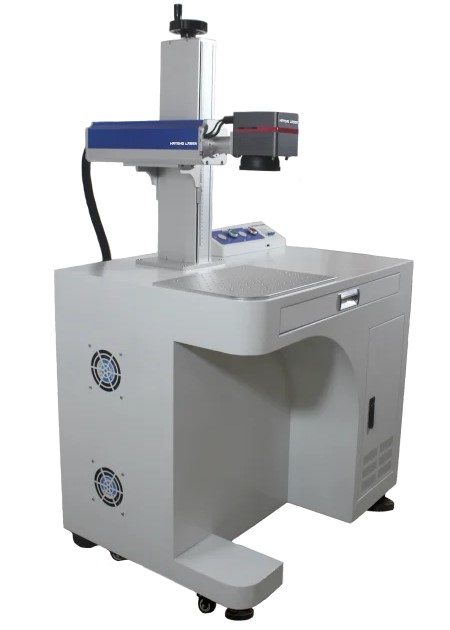
The HLF30 comes with a galvo scanner and F-theta lens, EZCAD software, and a red light preview and focus tool. That’s the standard 2D arrangement, and our explainer on the galvo scanner and F-theta lens shows why that combination gives such even marks across a flat field.
What it’s specified for
Serial numbers, QR and Data Matrix codes, logos, barcodes and text, deep engraving on metal, and marking on anodised and coated surfaces, on tools, auto parts and electronic components. Those are overwhelmingly flat-face jobs.
Getting the best out of it
Focus and settings make a big difference on any 2D machine. Our guide to laser marking settings: power, speed and frequency is a good place to start.
How do you decide for your parts?
Run through this quickly.
Step 1: Find the marking area
Mark out exactly where the mark goes and how big it is.
Step 2: Measure the height change
Check how much the surface rises or falls across that area alone.
Step 3: Try fixturing first
Ask whether a tilt, a smaller mark or a different position would bring it level.
Step 4: Test on a 2D machine
Send a sample and see the result. If the mark is sharp from edge to edge, you don’t need 3D.
Wrapping up
3D laser marking solves a real problem, keeping focus on surfaces that rise and fall too much for a fixed focus to cover. That’s the only problem it solves, though. For flat faces, gentle curves, small marks and parts you can fixture level, a 2D fiber laser does the job, and it’s simpler to run.
Most workshop marking falls on the 2D side of that line. Before paying for 3D, measure the area you actually mark and try a smarter fixture.
If you’re not sure which side your parts fall on, send a few to Hateng Laser. We’ll mark them on the HLF30 and show you whether 2D handles them cleanly, and we’ll tell you honestly if a part really needs a 3D system.
FAQs
What is the difference between 2D and 3D laser marking?
A 2D laser marks with a fixed focus height across a flat field. A 3D laser adds dynamic focus, shifting the focal point during marking so it stays sharp on curved, domed or stepped surfaces.
Do I need a 3D laser to mark a round shaft?
Not usually for small marks. A serial number or code on a shaft often stays within the focus zone. Long text wrapped around the shaft may need 3D or a rotary setup to keep focus.
Can a 2D laser mark curved surfaces?
Yes, if the height change across the marked area stays within the laser’s depth of focus. Small marks on gentle curves usually work fine. Steep curves with large marks are where 2D starts to struggle.
Is a 3D laser marking machine better than a 2D one?
Only for surfaces that need it. For flat and gently curved parts, a 2D machine marks just as well with simpler setup. 3D adds hardware, software and setup time, so it’s worth it only for genuinely uneven surfaces.
What is dynamic focus on a laser marker?
It’s a motorised optic inside the laser head that moves the focal point up and down during marking. It lets a 3D laser keep the beam sharp as the surface height changes across the mark.
Is the HLF30 a 2D or 3D laser marking machine?
The HLF30 uses a galvo scanner with an F-theta lens and a focus tool, which is the standard 2D arrangement. It’s specified for flat-face jobs like serial numbers, codes, logos and deep engraving on metal.