By Hateng Laser | 10 min read
The HLF30 ships as a complete marking system: the machine unit with its laser source, a galvo scanner with F-theta lens, EZCAD marking software, a red light preview and focus tool, and USB and power cables. For anyone buying a laser marking machine in India, the list that matters just as much is the one that isn’t in the box: fume extraction, safety eyewear, a bench, fixtures and freight from the factory.
Key insights
- The HLF30’s box covers everything needed to fire the laser: source, scanner, lens, software, preview tool and cables all come together.
- Ready to use doesn’t mean nothing to arrange: extraction, eyewear, a stable bench and part fixtures sit outside the inclusion list.
- Ex-works pricing moves the final number: transport and transit risk from Bhiwandi are the buyer’s to plan.
- Two quotes rarely describe the same box: compare inclusion lists line by line before you compare totals.
Before you compare quotes
Ask every supplier for their inclusion list in writing, in the same format, before discussing price. Software licences, focus tools and cables are the items most often missing from one quote and quietly present in another, and each one changes what the total really buys.
Most buyers start their search with a price range and a wattage. Both are reasonable starting points, but neither tells you whether the machine will actually mark a part on the day it arrives, or what else you’ll spend in the first month to get there.
That’s the gap this piece fills. We’ll go through the HLF30’s inclusion list item by item, explain what each part does on the shop floor, and then be equally plain about the things you’ll still need to arrange yourself.
If you’re comparing a laser marking machine for metal from several suppliers, use this as a checklist. The items are fairly standard across fiber marking systems, which is exactly why missing ones are easy to overlook.
What exactly ships in the box with the HLF30?
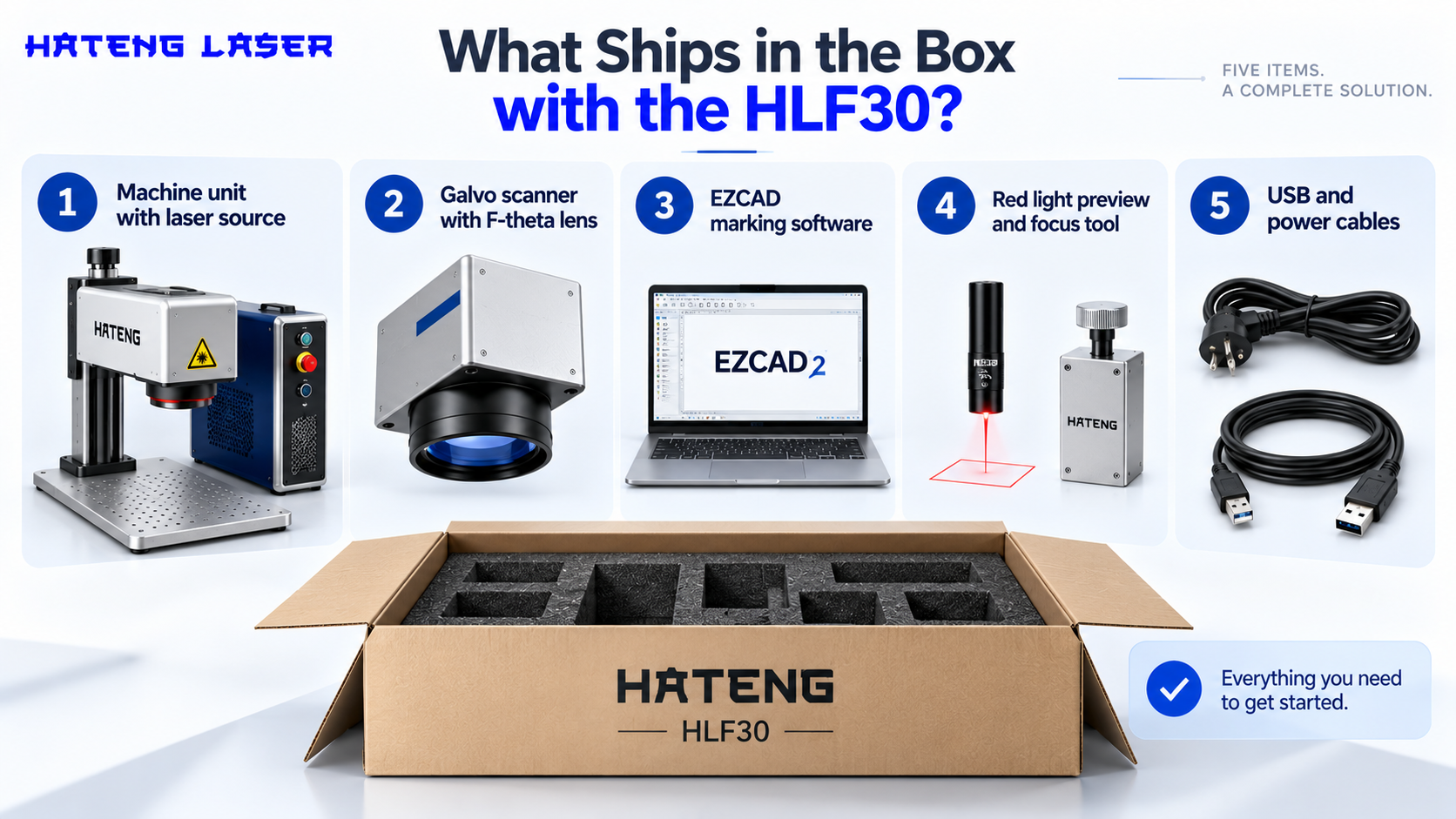
Five items make up the inclusion list published on the HLF30 product page. Together they form a working configuration rather than a set of parts.
Machine unit with laser source
The fiber laser source and the machine body arrive together as one unit. That matters for support, because the source and the machine are covered by their own warranties and come from the same supplier, so there’s one point of contact if something goes wrong.
Galvo scanner with F-theta lens
The galvo scanner uses two fast-moving mirrors to steer the beam across the marking area. The F-theta lens focuses that beam so the spot stays consistent across the whole field instead of distorting towards the edges. This assembly is what decides how sharp small text and dense codes come out.
EZCAD marking software
EZCAD is the control software used widely on galvo fiber marking systems. JCZ, the company behind it, describes EZCAD2 as supporting fiber and other laser types, QR and Data Matrix codes, and variable text from sequential numbers, dates and Excel sheets. Serial numbering and batch codes run from there.
Red light preview and focus tool
The red light preview traces the outline of the mark on the part before the laser fires, so the operator can check position without wasting a piece. The focus tool helps set the correct working distance between lens and part, which is the most common reason a first mark comes out faint.
USB and power cables
These connect the machine to power and to the computer running the software. They sound trivial, but a missing cable is the kind of detail that holds up an installation, so it helps that they’re on the list.
| Included item | What it does | Why it matters on day one |
| Machine unit with laser source | Generates the beam | The core of the system, under warranty |
| Galvo scanner with F-theta lens | Steers and focuses the beam | Decides sharpness and code quality |
| EZCAD software | Designs and controls the mark | Serials, codes, logos and text |
| Red light preview and focus tool | Positions and focuses the mark | Fewer wasted test pieces |
| USB and power cables | Connects and powers the system | No hunting for the right cable |
What doesn’t come in the box?
None of these items is hidden or unusual. They’re simply outside a marking machine’s inclusion list for almost every supplier, and they’re worth planning before the machine lands.
A computer to run the software
The machine connects over USB, so it’s driven from a computer. If you don’t have a spare PC for the marking station, budget for one, and confirm the software requirements with Hateng before you buy.
Fume extraction
Marking metal and especially coated or painted surfaces produces fumes and fine particles. An extractor at the marking point protects the operator and keeps residue off the lens. Our safety tips for laser marking operators cover ventilation alongside other daily habits.
Laser safety eyewear
Fiber lasers work at an infrared wavelength you can’t see. Anyone near an unenclosed marking station needs eyewear rated for that wavelength, not ordinary safety glasses.
A bench, fixtures and part holders
A stable, level bench keeps focus distance steady. Fixtures that hold each part in the same spot are what turn a good single mark into a repeatable production mark.
Rotary and other attachments
Cylindrical parts such as shafts, pipes and bottles usually need a rotary attachment to mark around the circumference. If that’s part of your work, raise it at the enquiry stage.
| Not in the box | Why you need it | When to arrange it |
| Computer | Runs EZCAD and stores job files | Before delivery |
| Fume extractor | Operator health and lens cleanliness | Before the first coated part |
| Laser safety eyewear | Eye protection at the laser’s wavelength | Before the first firing |
| Bench and fixtures | Stable focus and repeatable positioning | During the lead time |
| Rotary attachment | Marking round parts | Only if your parts need it |
What does “ready to use on delivery” really mean?
It means the system is complete and configured, not that nothing needs doing on the day.
What is already done
The source, scanner, lens and software are matched as one configuration. You aren’t sourcing a controller or pairing a lens with a scanner yourself.
What you still set up
Placing the machine on its bench, connecting it to power and the computer, setting focus height with the focus tool, and running the first test marks. Setup is short, but it isn’t zero.
Your first job file
Most first days are spent building templates: your logo at the right size, your serial format, your QR or Data Matrix content. Bring real parts and real data to that session.
What does ex-works pricing mean for your final cost?
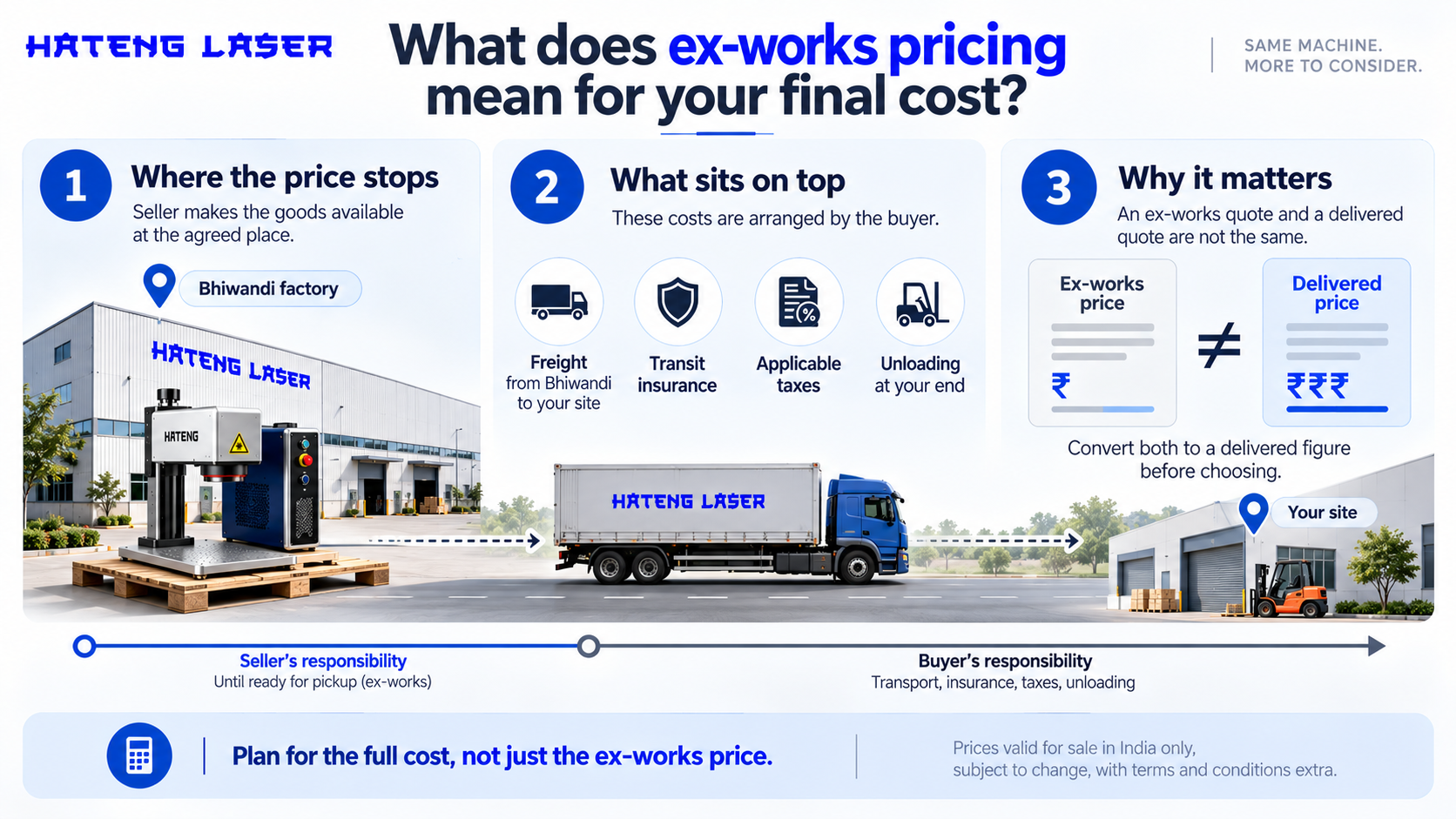
Hateng Laser quotes prices ex-works, valid for sale in India only, subject to change, with terms and conditions extra.
Where the price stops
Under the Incoterms rule, ex-works means the seller makes the goods available at an agreed place, while the buyer arranges transport and takes on the risk from the moment the goods are ready for pickup. For the HLF30, that place is the Bhiwandi factory.
What sits on top
Freight from Bhiwandi to your site, transit insurance, applicable taxes and unloading at your end. None of these is unusual, but each belongs in the budget.
Why this matters when comparing
A delivered quote and an ex-works quote aren’t the same number, even when they look close. Convert both to a delivered figure before choosing.
What makes up laser engraving machine cost beyond the machine?
The real laser engraving machine cost is the machine plus everything needed to run it safely and consistently. Our full cost breakdown for laser marking machines in India goes deeper into the numbers.
One-off costs
Freight, a computer if needed, a bench, fixtures, eyewear and an extractor. These are paid once and last years.
Running costs
Electricity, extractor filters, lens cleaning and operator time. A fiber marker has no ink, ribbons or marking pins to buy.
The cost of choosing wrong
A machine missing an item you needed costs a delay while it’s sourced, which on a production line is often the biggest cost of all.
| Cost type | Examples | How often |
| Machine | Source, scanner, lens, software, preview tool, cables | Once |
| Setup | Freight, computer, bench, fixtures, eyewear, extractor | Once |
| Running | Power, filters, cleaning, operator time | Ongoing |
| Hidden | Delays from missing items or wrong spec | Avoidable |
What does the warranty cover?
Two separate one-year warranties
The HLF30 carries a one-year warranty on the laser source and a one-year warranty on the machine. The source is the most valuable single component, so its own cover is worth noting.
Questions worth asking
What counts as the machine versus the source, how service is arranged, and whether the lens is treated as a wear item. Get the answers in writing with your quote.
What can the HLF30 mark?
The HLF30 is specified for serial numbers, QR and Data Matrix codes, logos, barcodes and text, deep engraving on metal, and marking on anodised and coated surfaces.
Codes and traceability marks
Serial numbers, QR codes and Data Matrix codes for tracking parts through production and after sale.
Brand and information marks
Logos, text and barcodes on finished products.
Deep engraving and coated surfaces
Recessed marks on metal that last through handling, and marks on anodised and coated parts where the laser removes the top layer to reveal contrast. The HLF30 product page lists tools, auto parts and electronic components as typical work.
How should you use the lead time?
The standard HLF30 model has a lead time of four to five days, which is enough to have the station ready before the machine arrives.
Prepare the station
Bench, power point, computer and extractor, all in place and tested.
Gather samples and data
Pick five or six real parts, including the hardest one to mark, and prepare your serial format and code content.
Name the operator
Decide who will run the machine and make sure they’re present on the setup day.
Wrapping up
The HLF30’s box holds everything needed to make a mark: source, scanner, lens, software, a preview and focus tool, and cables. What it leaves to you are the things that surround any marking machine, from extraction and eyewear to a bench, fixtures and freight from the factory. Knowing both lists before you buy is what makes a quote comparable and a first day productive.
Hateng Laser publishes the HLF30 inclusion list on its product page, which makes it easy to hold against other quotes, and the standard model’s short lead time leaves you a few days to prepare the station properly. Warranty on both the source and the machine, and a single supplier behind both, keep the after-sales conversation simple.
If you’re shortlisting a laser marking machine, send your parts and marking requirements to Hateng Laser and ask for the inclusion list alongside the quote, so you can compare like with like.
FAQs
What is included with the HLF30 laser marking machine?
The machine unit with laser source, a galvo scanner with F-theta lens, EZCAD marking software, a red light preview and focus tool, and USB and power cables. It is supplied ready to use on delivery.
Does a laser marking machine come with fume extraction?
Not with the HLF30, and usually not with most marking machines. Plan a fume extractor separately, especially for coated, painted or plated parts, since it protects the operator and keeps residue away from the lens.
How long does the HLF30 take to deliver?
The standard HLF30 model has a lead time of four to five days. Freight from the Bhiwandi factory is arranged separately, because prices are quoted ex-works, so allow for transit time to your site.
What warranty comes with the HLF30?
A one-year warranty on the laser source and a one-year warranty on the machine. Ask Hateng Laser to confirm in writing how service is arranged and which parts, such as the lens, count as wear items.
Do I need a computer to run a fiber laser marking machine?
Yes. The HLF30 connects over USB and runs EZCAD software on a computer, so a PC is needed at the marking station. Confirm the software requirements with Hateng Laser before delivery so the computer is ready.
What does ex-works price mean for a laser marking machine?
The price covers the machine made available at the seller’s premises. Freight, transit insurance, applicable taxes and unloading are arranged and paid by the buyer, so convert every quote to a delivered cost before comparing.